
Today, Teloa Community edition (0.2.2) is officially available.
Teloa is an AI-native team workspace. Describe a goal in natural language, create AI employees with ongoing responsibilities, and organize a team around projects, materials, memory and deliverables.
This release brings together AI employees, AI teams, multiple execution harnesses, projects and project memory, local document indexing, voice interaction and versioned delivery. It also turns lessons from product development into two standardization initiatives made publicly available to the industry.
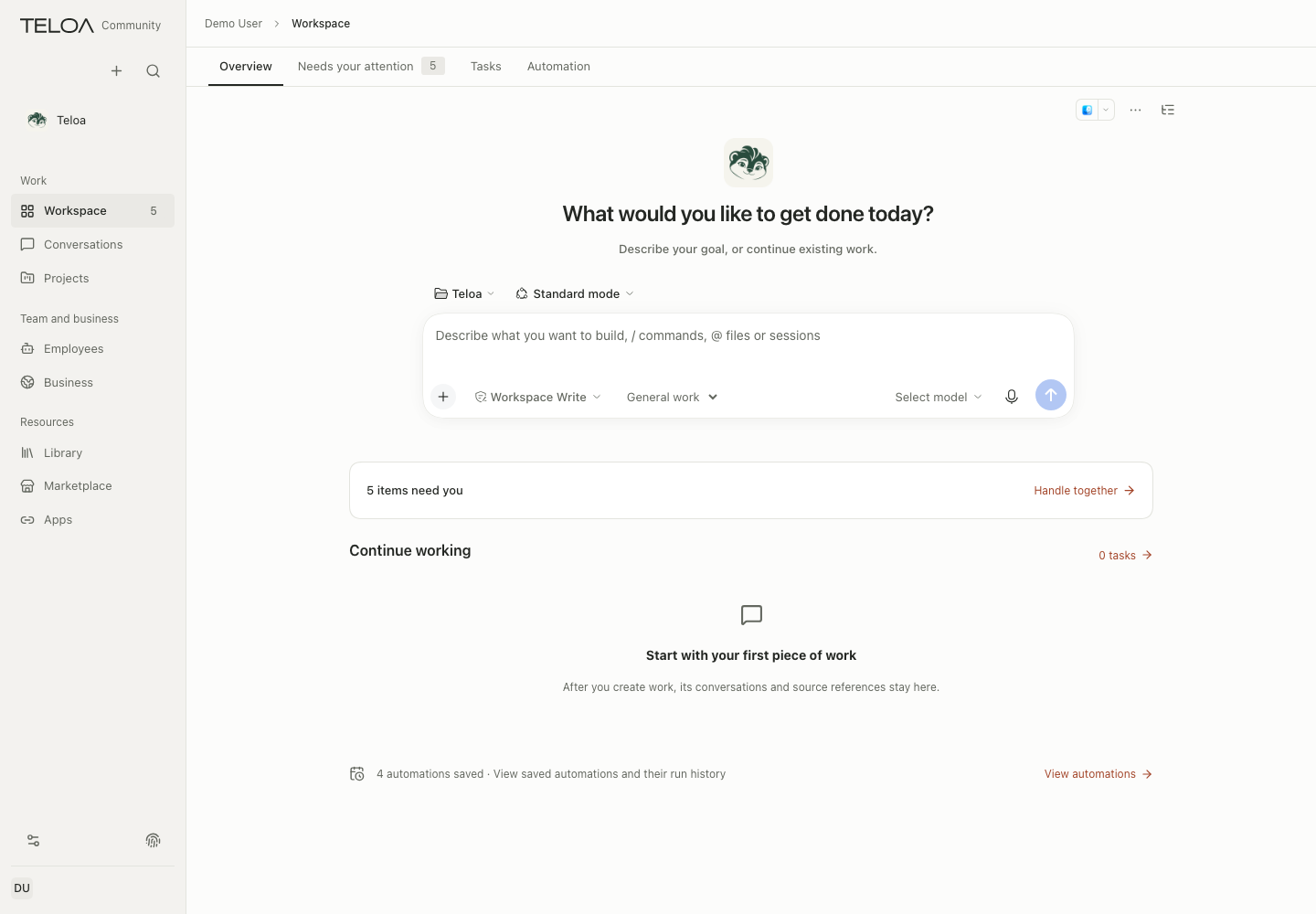
30-second workspace tour
The following are real Community edition screenshots with demonstration data; diagrams explain how the work fits together.
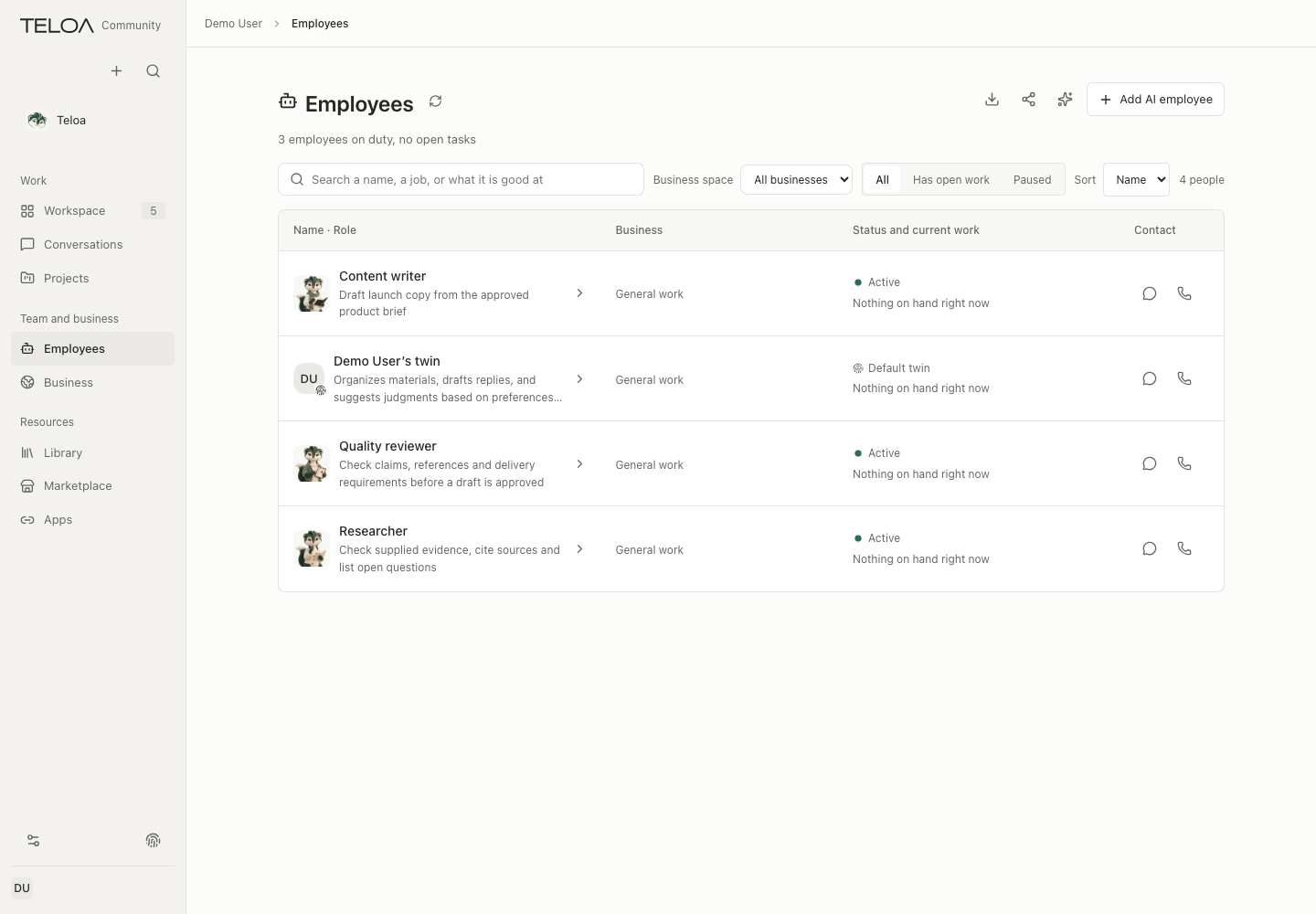
AI employees: persistent roles for ongoing work
Describe the role, working requirements and expected deliverables in natural language or Markdown, then review the proposal to create an AI employee.
For example:
Create a product researcher to organize user feedback, check product assumptions, and deliver source-backed analysis and validation suggestions. List open questions when evidence is insufficient, and ask for my confirmation before publishing externally.
Each employee can have its own responsibilities, working methods, business scope, reference materials, skills and available tools. These settings stay with the role so it can keep handling similar work.
Chat privately with an employee, inspect its tasks, deliverables and accumulated experience, or add it to a team to collaborate on a shared goal.
An employee's role identity is managed separately from the model. Changing models or starting a new task can preserve the same employee's responsibilities and work history.
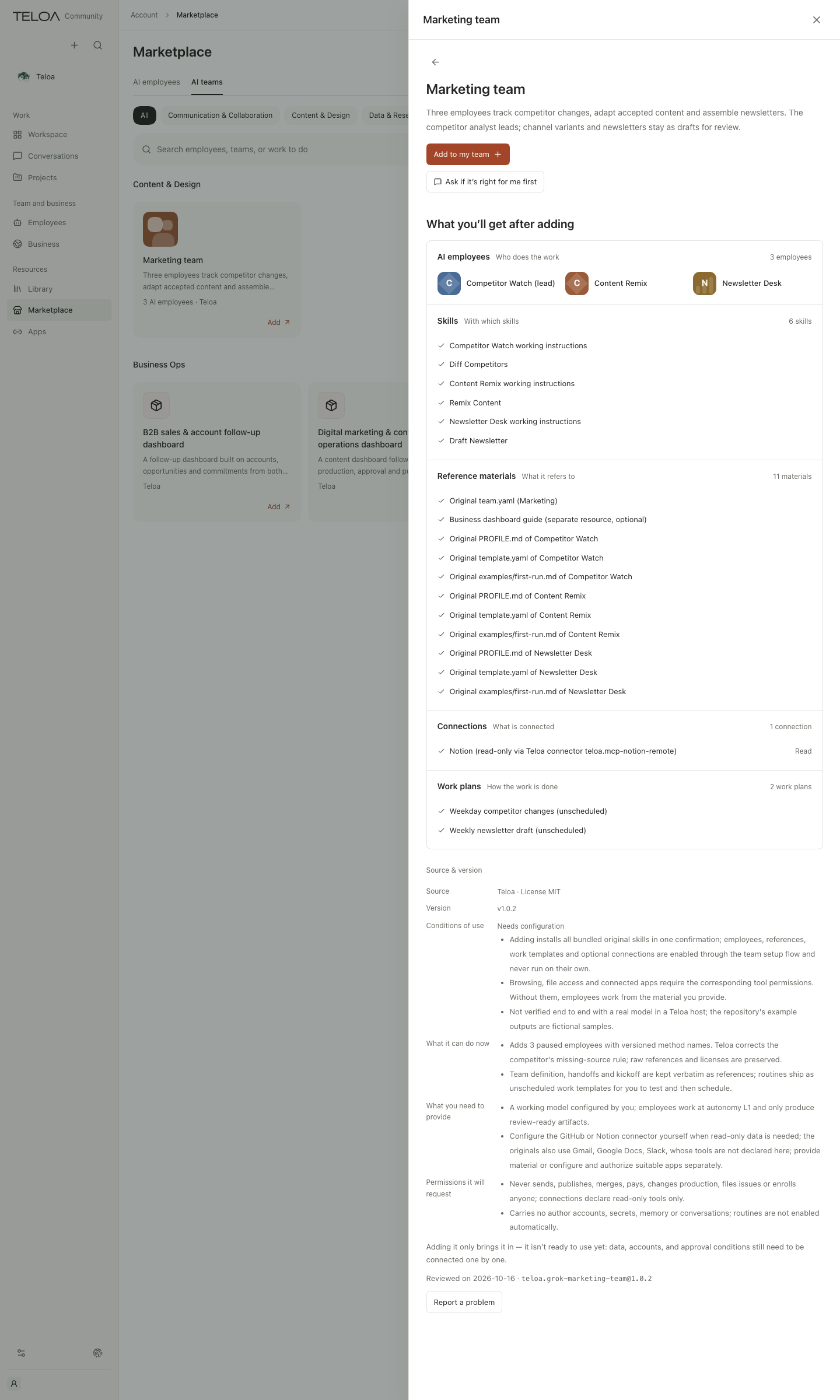
AI teams: organize responsibilities around shared results
Combine multiple AI employees into a team with clear responsibilities for research, analysis, production and review.
The marketplace provides team templates for product, marketing, sales and other work. They organize roles, skills, reference materials, optional connections and work templates together, reducing repetitive setup. After adding a template, review the members, target business and work arrangements before enabling the capabilities you need.
Use @ mentions in group chats to involve specific employees while retaining the source of assignments, collaboration and result replies. Main messages and topics are organized separately, with distinct entry points for ordinary chats, employee conversations and groups.
Persistent teams carry ongoing responsibilities; temporary execution teams serve the current task. Independent parts can run in parallel before the responsible worker consolidates the results. Collaboration across business areas continues to follow each member's actual access to materials and tools.
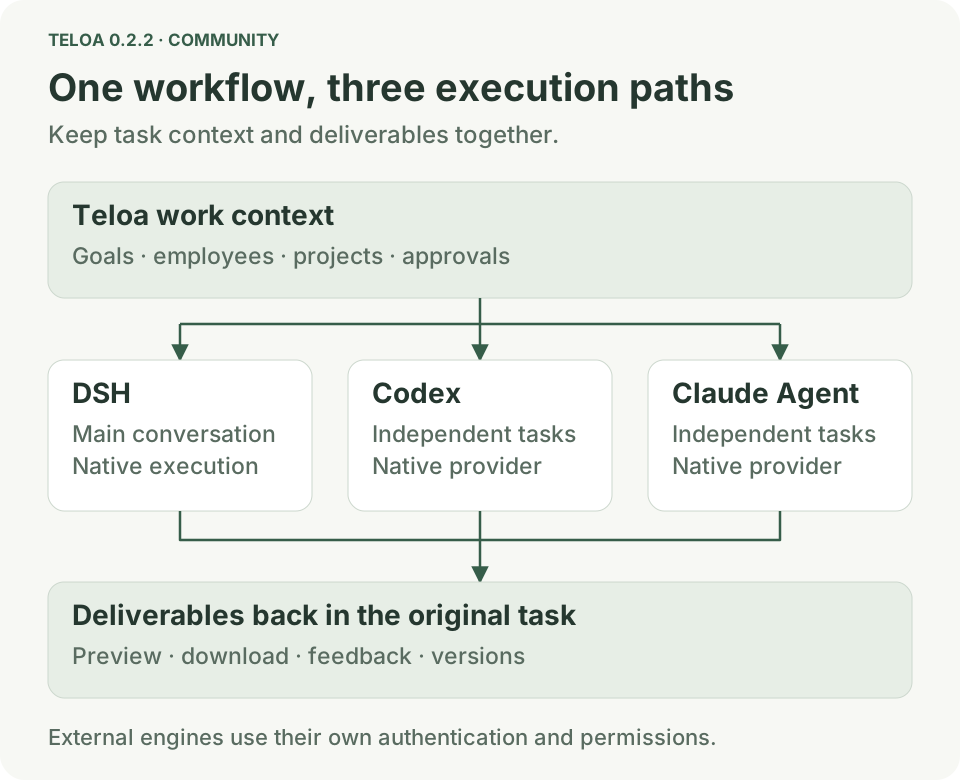
Multiple harnesses: DSH, Codex and Claude Code
Teloa connects different execution engines to the same workflow:
- DSH handles the main conversation, native execution and tool calls.
- Codex handles independent code, file and tool tasks through its native execution provider.
- Claude Code / Claude Agent connects to the native Claude execution path, handles independent work and returns the results.
You can ask directly:
Use Codex to review the code this time, and have Claude Agent analyze these files.
The results return to the original task, retaining the work's source and attribution.
Model connections and harnesses are configured separately. Each execution provider uses its own authentication, and external engines require confirmation of their native working directory and permissions before launch. Choose the execution approach that fits the work, then follow its actual status and deliverables in the workspace.
Projects and project memory: carry context into subsequent work
Projects bring together goals, briefs, tasks, employees, groups, materials, automations and deliverables, with dedicated project conversations.
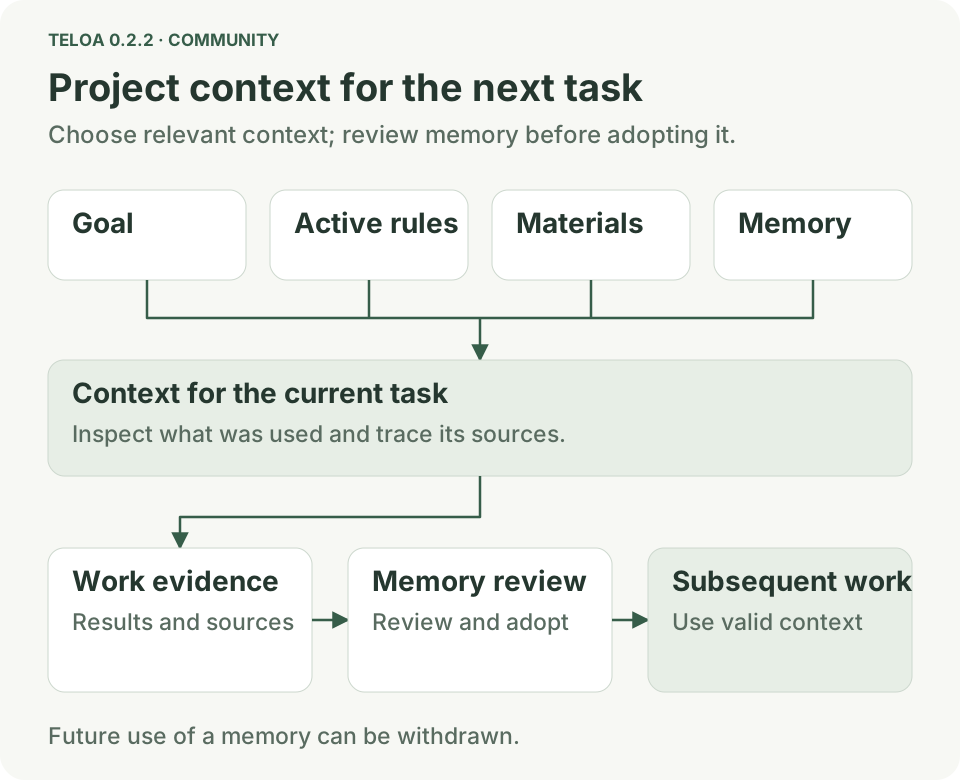
Project goals, active rules, relevant materials and memories can participate in subsequent model requests. Inspect what was used and its sources to understand the basis of an employee's work.
Review memory candidates, trace their sources, withdraw future use, and share a fixed revision. New conversations can choose whether to read and write long-term memory, and the owner decides whether personal preferences participate in a project.
From the first discussion through later deliveries, a project can accumulate reusable background, rules and reasoning.
Local document indexing and local models: put your own materials to work
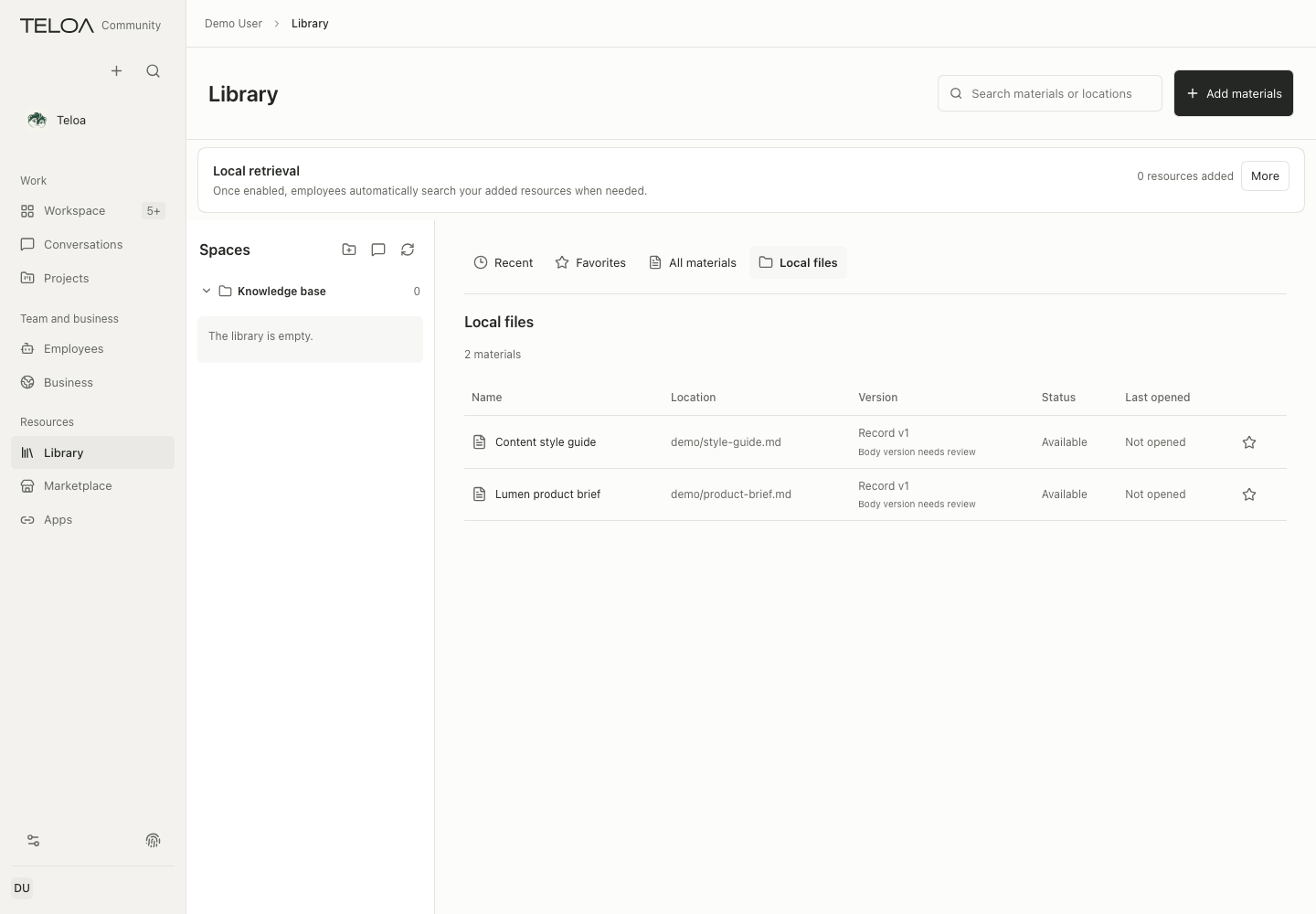
Add explicitly selected local Markdown files to an index, track material versions, and inspect citations and the locations of source excerpts during retrieval.
Prepare retrieval models after confirmation on the materials page, with options including Qwen3 Embedding and EmbeddingGemma. Chat models handle understanding and generation; embedding models handle retrieval. The two are managed separately.
Through Ollama, check the local chat environment, connect existing models, and confirm a download or cancel model preparation.
The document index runs on the device or container where you deploy Teloa. Answers can use local models or remote models you configure. When you choose a remote chat service, relevant retrieved excerpts may be sent to that service as part of the current context.
Natural-language tasks and versioned deliverables: from a brief to a result
The main task-creation flow centers on a natural-language or Markdown brief. Describe the goal, requirements and delivery format; the source conversation, project and business are carried in from context.
Follow execution, handle required approvals, stop work, preview files and collect deliverables in the same workflow. Even before creating employees, you can work independently with Teloa, the squirrel assistant, or the general-purpose Agent.
Preview and download deliverables, then request revisions to a selection or the whole document. Each revision retains a clear version. Earlier results such as v1 and v2 remain available with their original attribution, and acceptance can refer to the specific version adopted at the time.
The workspace previews Markdown, code, images, PDF, HTML, Office files and spreadsheets so you can inspect the actual delivery.
Business workflows, dashboards and the marketplace
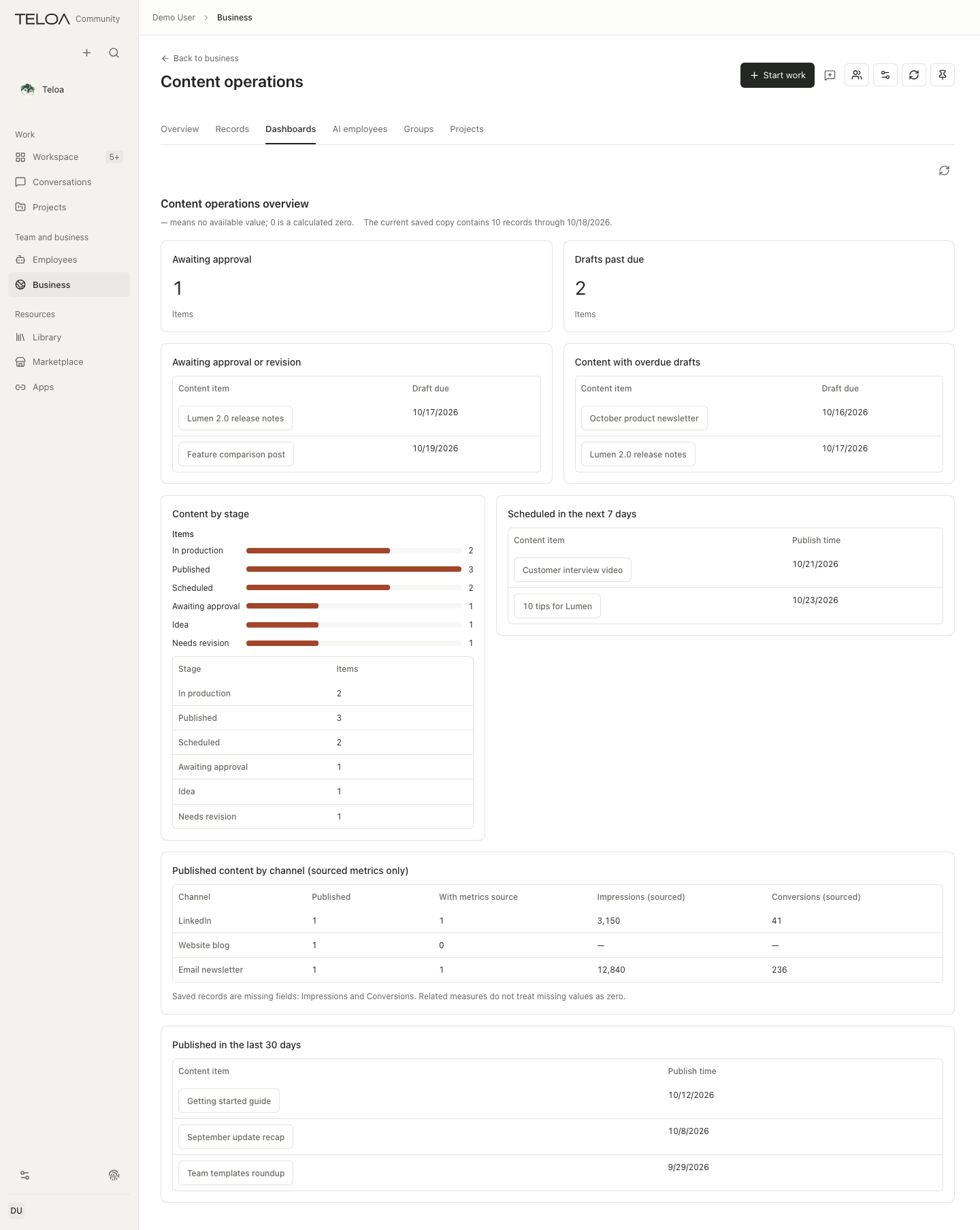
Create or adjust business configurations in natural language, review and adopt the draft, then import records or connect authorized data sources.
Business content and statistical dashboards are organized separately, so you can inspect individual records and observe changes across the business. Tasks, materials and deliverables can continue within the same business context.
Discover AI employees, AI teams, skills, apps and connectors through dedicated marketplace entries. The apps page manages installed capabilities and connections.
For more complex work, use step-by-step Workflow orchestration, PTC tool composition, and Ralph iteration when explicitly requested by the owner. Optional capabilities such as Browser Use, Computer Use and IM channels are configured and authorized separately as needed.
Voice input, TTS and calls: collaborate by speaking
Teloa brings voice input, recognition, speech output and calls into the workspace:
- Voice input: SenseVoice supports local transcription. Recognized text enters an editable draft for the owner to review and send.
- Call recognition: choose MiniMax cloud recognition or local SenseVoice.
- Text-to-speech: MiniMax, OpenAI and ElevenLabs are supported, with separate model, voice and credential settings.
- Voices and previews: MiniMax offers Mandarin and English voice selection and previews. Other providers use their corresponding model and voice settings.
- Continuous speech and call controls: MiniMax supports continuous audio output, reducing repeated starts between short phrases, while retaining mute, interruption and hang-up controls.
Call an employee or the squirrel assistant, or leave a voice message to add work requirements. Calls remain associated with the original conversation, and you can continue reviewing work and deliverables after a call ends.
Auto Dream, employee experience and personal digital twins
Auto Dream organizes private daily summaries from work evidence and records employee experience with its source and scope. You can inspect it and withdraw its use.
Employee experience, project memory and personal digital twin materials are managed separately. A twin can accumulate judgment examples supplied by its owner and observations of working habits to help organize personal working methods. Each material retains its own scope of use.
Methods you have confirmed as useful can also become skills or recurring-plan drafts. Work arrangements are explicitly enabled by the owner, allowing recurring work to develop into processes that can be inspected and adjusted.
Two open standards: how AI works and acts safely
To describe how AI workers are organized and where their security boundaries lie, Teloa has made two standardization initiatives publicly available to the industry, for developers, enterprise users and other platforms to implement, review and improve together.
AI Worker Standard 1.0
Initiated and maintained by Teloa, AI Worker Standard 1.0 provides working definitions and collaboration contracts for AI Workers, AI Teams and AI Organizations.
It describes:
- Worker identity, responsibilities and definition versions that persist across tasks.
- Inputs, outputs, dependencies, authorization conditions and acceptance requirements.
- Responsibilities, handoffs and shared deliverables between team members.
- Organizational accountability, resource constraints and change governance.
The standard distinguishes role definitions, actual employee instances and individual executions. It includes a core specification, a work and collaboration profile, and JSON and YAML examples to help different implementations express what a worker is responsible for, how it collaborates and how its deliverables are checked.
Enterprise Agent Identity and Authorization Security Baseline
Initiated and maintained by Teloa AI Security, the Enterprise Agent Identity and Authorization Security Baseline v1.0 contains 240 verifiable requirements across 10 security domains.
The baseline covers identity authentication, delegation and permissions, authorization decisions, credential management, execution isolation, context security, output visibility, data and memory, lifecycle governance, and audit and response.
It provides L1 baseline, L2 standard and L3 enhanced assessment levels, together with online and offline self-assessment tools, maturity reports and Excel assessment sheets for platform design, supplier evaluation and security review.
Both specifications are open to industry use and collaboration. Product conformance must be checked against the specific version, deployment scope and actual evidence.
Read the security baseline and self-assessment tools
Get started with Teloa 0.2.2
Teloa Community edition (0.2.2) is available through GitHub, npm and Docker Hub for local deployment.
Start with a real project: describe the goal, select materials, create the employees you need, and let the team work toward deliverables you can review and accept.