
If AI can answer “How is the business doing?”, why retain a dashboard? Daily management repeatedly compares the same question. “Pending confirmation” today and next week should refer to records selected by the same conditions.
A model can help interpret figures, but if it chooses the scope anew each time, “completed items” gains little historical meaning. Teloa therefore establishes objects, fields, and metric criteria, then retains calculation results and times. AI can read these results, giving its explanation a basis that can be checked.
This separates calculation from interpretation. A dashboard provides a repeatable business view; explanations still need records and supporting material. The page can be simple without letting the meaning of a number silently change with an answer.
Bringing an analytical conclusion into daily management
Consider preparing a customer proposal as a hypothetical example. An employee finishes a draft, and its report can say “the materials are complete.” The person responsible has not yet reviewed it, so the business still needs an outstanding confirmation item. Both descriptions are meaningful, but refer to different stages.
A dashboard showing “1 completed item” without a definition leaves the user unable to tell whether their involvement is still needed. Asking AI to analyze the number cannot supply the missing definition.
A metric therefore needs its objects, fields, and conditions defined before choosing a number, list, or chart to display it. Business records and dashboards follow the same definitions, giving later analysis a common starting point.
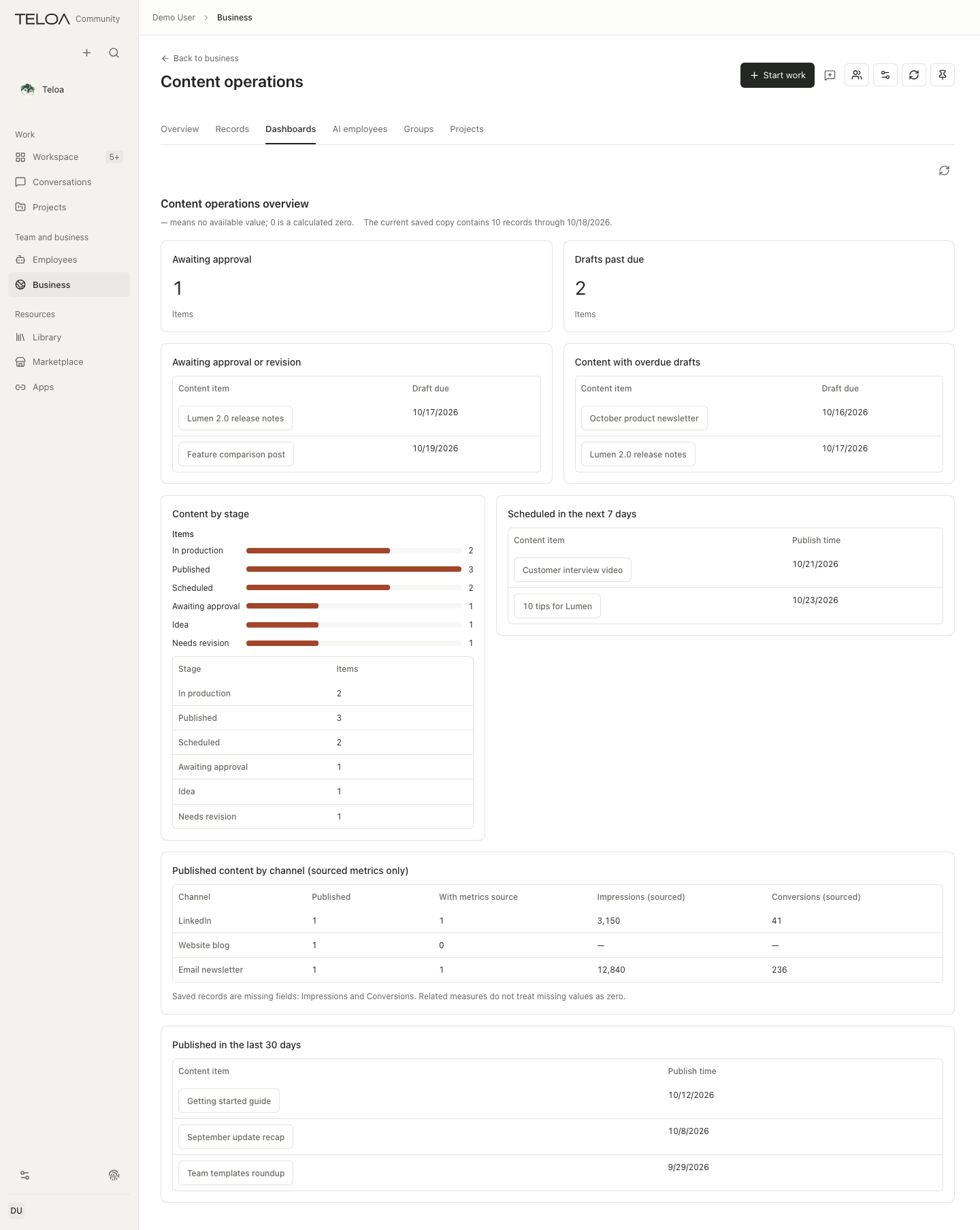
Check the comparison before explaining a change
Several items await confirmation in the morning, and the number rises in the afternoon. New items may have arrived, or existing records may have gained a status. The total alone cannot show that the team is getting slower.
The dashboard retains results and calculation times per component. Components may update at different times, and the page's latest update time does not mean every figure was calculated at that moment. Comparing a particular metric requires its own result's calculation time. Saved values also need a corresponding update after records change.
Likewise, a changed statistical scope or completion criterion makes two numbers unsuitable for direct comparison as one consistent trend. The calculation can be accurate while the business interpretation is wrong. Retaining the conditions before analyzing change helps distinguish updated data from actual progress.
Metric definitions and AI explanations therefore need different maintenance. A count of unconfirmed matters should be computed from defined objects, fields, and conditions. “The increase may reflect new clients this week” is an interpretation needing evidence. They may appear on the same page without substituting for each other.
AI can currently use the dashboard-reading tool to obtain the latest saved component results and update times. Reading does not trigger a refresh. The tool and interface use the same dashboard service, so analysis can use an existing calculation instead of redefining “unconfirmed” for each answer.
A shared service does not guarantee identical content in both places. The interface can select a configured time range, while the current model read uses the dashboard’s default range. Only components connected to time filtering follow that selection; others still use the full range. Results may also update between reads. Discussing a specific figure requires checking the business scope and the relevant component's time conditions and calculation time.
Missing data should not become zero on a chart
A dashboard needs to distinguish three situations:
| Situation | What it means |
|---|---|
| The calculation returns zero | No records match the current definition |
| The query failed | The answer is currently unknown |
| The result has not arrived | It is still pending and cannot be treated as zero |
Displaying them all as zero may make the user think there is no problem when the dashboard simply cannot see it.
Teloa retains calculation results and problems per component. When one part is unavailable, other valid content remains visible and the gap remains identifiable. Older results also need a time, rather than appearing as an apparently current number.
The page may sometimes look incomplete, but it avoids using a tidy chart to imply certainty. People can handle what is already established, then decide whether to wait for or investigate a source that has not returned.
Return from the overall number to individual items
Suppose the pending count rises. The owner follows the dashboard back to relevant records, finds that one proposal still lacks usage conditions, and starts a material check from that record. After the employee delivers a comparison of conditions, the owner can add an explanation, wait for the client's answer, or adopt a local record change when its basis holds. The dashboard directs attention, linked work carries the investigation, and the record retains confirmed progress.
This also explains the role of the work overview. The business dashboard shows the overall set of matters; the work overview shows progress on one investigation. Using these different scales together lets the owner retain both the overall need and the specific work. Counting completed model calls alone cannot establish that a client matter has advanced.
The owner currently organizes these checks, investigations, and adoptions through existing entry points. The system does not yet automate the full discovery, prioritization, and action-preparation process. Connecting shared business definitions, readable calculation results, and specific records gives daily judgment a continuous path. Its value is whether the owner can find work worth handling sooner and advance it through evidence, beyond how many charts appear.